Projection modes
Suede has three projection modes: Exact, Simple and Warp. They are three ways to put the same content on the same outputs, and this page is the one description of all three. The Configuration reference stays the field reference, and How it works covers the pipeline underneath.
Only an overlapping layout (an appliance provisioned with
allow_overlaps = true) has a mode to
choose. A tiled layout is already one texel per pixel and has no canvas.
Overview
All three modes work on one shared canvas: the browser renders once into a
virtual canvas, and each output selects a rectangular part of it, its
geometry.slice. The slices are identical in every mode. The mode decides only
what happens between the slice and the output's pixels. The slicer always crops
whole canvas pixels, rounding the slice's edges, in every mode; see
Slice units.
| Mode | What each output shows | Scale and correction | Use it when |
|---|---|---|---|
exact |
Exactly its own raster's worth of canvas pixels, at whole-pixel canvas coordinates | Output scale 1, no corner or center correction, no resampling | Pixel-for-pixel fidelity matters: LED walls, tiled panels, content authored at the wall's resolution |
simple (default) |
A rectangular crop of the canvas, scaled to the raster | Any scale; the crop is always whole canvas pixels | Flat layouts that need scaling or a canvas that is not the outputs' pixel size |
warp |
The same crop, geometrically fitted to the surface | Retained corner pins and center remap | Projectors on curved, tilted or angled surfaces |
More detail on how the modes differ in the pipeline:
| Aspect | Exact | Simple | Warp |
|---|---|---|---|
| Mapping geometry | Strict 1:1 placement at whole-pixel canvas coordinates; no correction | Rectangular crop and scale | Four destination corner pins and a two-fraction optical center remap |
| Edge blending and seams | The same blending ramps on overlapping seams; overlaps are whole pixels | Pairwise blending ramps, one per seam, with gamma-shaped falloff (blend: true by default; blend: false still duplicates overlapping regions without ramps) |
Pairwise blending ramps, one per seam, with gamma-shaped falloff |
| Border anti-aliasing | Not applicable | Not applicable (aligned to raster) | Continuous sub-pixel border coverage attenuating gain and black lift |
| Black level compensation | Fixed or adaptive black lift, same as Simple | Fixed or adaptive black lift; see Adaptive black lift | Fixed or adaptive black lift, same as Simple |
| Renderer | Canvas slicer, GPU and CPU; unavailable on a tiling appliance | GPU and CPU pipelines | Requires the GPU (Vulkan) pipeline; there is no EGL/GLES path |
| Sampling | Always an exact integer copy; the resampling filter is irrelevant | Exact integer texel sampling at 1:1; the filter applies otherwise | Exact integer sampling on identity, including 1:1 rotated or flipped outputs; the configured filter on non-identity pins or any non-1:1 scale |
Because the slices are shared, an operator can arrange positions and crops in Simple, then switch to Warp to calibrate corner pins and center fractions against the physical surface without losing the content layout. Switching modes does not silently overwrite the shared content settings or the correction; see Switching modes.
Exact
Exact is strictly one-to-one. Every enabled output shows exactly its own
raster's worth of canvas pixels (transform.physical_size of its mode, so a
rotated output counts as its swapped raster), placed at whole-pixel canvas
coordinates, at output scale 1, with no correction. The canvas may be larger
than the union of the outputs. It needs the canvas slicer and
projection.canvas. Use it when what you author must be what each panel
lights.
Exact always stores slices in pixels; see Slice units.
Rules
The daemon enforces these rules whenever projection.mode is exact, each as
its own message in the 422:
projection.canvasis required:projection.canvas is required in exact mode.- Every enabled output has an effective scale of exactly 1.0 (or none):
outputs[i].scale must be 1.0 in exact mode. - Every enabled output's
geometry.sliceis a whole-pixel rectangle of exactly its raster:outputs[i].geometry.slice must be a whole-pixel rectangle of exactly 1920×1080 canvas pixels in exact mode; got 1919.5×1080 at (0.5, 0). It must also lie inside the canvas:outputs[i].geometry.slice must lie inside the 3680×2000 canvas in exact mode; got 1920×1080 at (1900, 1000)(the sizes are the output's own). - No corner or center correction:
outputs[i].geometry has corner or center
  correction, which exact mode does not carry
. Exact does not retain correction; the switch into it strips it (below), so a conforming document never trips this, but a write that adds pins while in Exact is refused rather than silently ignored. projection.arrangement, if present, hascontentScale1 and a whole number of pixels of overlap on every seam:projection.arrangement implies a 0.5 px overlap; exact mode arranges in whole pixels, andprojection.arrangement.contentScale is 0.9; exact mode arranges at content scale 1.filteris accepted and ignored;testPattern,blend,gamma,blackLift,freeRun,rendererandtemporaryare unaffected.
Unavailable on a tiling appliance
On an appliance that tiles (allow_overlaps = false) Exact is unavailable.
There is no canvas, slice or slicer to constrain, and a tiled layout at output
scale 1 and integer positions is already one texel per pixel. A write of
mode: exact is refused with exact mode needs the canvas slicer: this
appliance tiles (allow_overlaps = false); tiled output is already one-to-one at
output scale 1. See allow_overlaps.
Status
GET /api/v1/projection/stats reports Exact in its geometry block.
geometry.exactAvailable is false on a tiled appliance (and on a build
without projection machinery), with the reason in geometry.exactReason; it is
true otherwise, when exactReason is absent. Exact needs no capability probe
beyond Simple's, so while it is requested and available
geometry.effectiveMode is exact, including on the CPU renderer; if it is
requested but unavailable the effective mode is simple. The reference UI
disables its Exact button with exactReason as its tooltip.
Recommendation
In Exact GET /api/v1/projection/recommendation has one answer: the canvas
itself. idealWidth is the canvas width, approximate is false, presets is
empty, and warnings holds the one warning exact mode: the canvas is defined
by the output placements. There is nothing to recommend because the output
placements define the canvas.
Simple
Simple is the default. Each output shows a rectangular crop of the canvas
(geometry.slice), scaled to its raster, with no geometric correction.
Overlapping beams are blended with a ramp per seam. Use it for flat layouts
that need scaling, or where the canvas is not the outputs' pixel size. When
projection.canvas is absent, Simple uses integer output positions.
Simple imposes none of Exact's rules: slices may be fractions or pixels,
outputs may be scaled, and overlaps need not be whole pixels. The
resampling filter applies to outputs that
do not map 1:1. Simple also keeps any Warp calibration it finds in the
document: while the mode is simple, a PUT that omits canvas or an
output's geometry keeps the previous value; see
Retaining and clearing calibration.
Warp
Warp adds retained geometric correction to the same content selection. Each
projector's picture is fitted to a physical surface using four destination
corner pins (geometry.corners) and two optical center fractions
(geometry.center). Content selection (geometry.slice) stays decoupled from
pin positions: dragging a corner pin adjusts physical alignment and keystone
correction within the projector's raster without altering the shared canvas,
resizing neighboring crops, or changing what content is selected. Use it for
projectors on curved, tilted or angled surfaces and for multi-projector blended
arrays. The warp-alignment test pattern
and Highlight overlaps are the tools for
calibrating it, and Editing geometry in the web UI
describes the editor. How it works covers the
homography, center remap and blending math.
Requirements
Warp needs projection.canvas and the following:
allow_overlaps = true;- the GPU renderer (
projection.rendererofautoorgpu, nevercpu); - output scale
1.0on every Warp output (a scale of anything else is refused withoutputs[N].scale must be 1.0 in warp mode until raster scaling is supported).
Any output transform is allowed: the slicer composes it.
Fallback to Simple
If any requirement is not met, or the GPU pipeline itself is unavailable:
- Suede automatically forces the effective mode to
simple. - The operator's saved
warpsettings, the requested mode, the corner pins and the centers, are safely retained in the configuration. - There is no
GET /api/v1/healthroute (only/healthz, a liveness probe). The limitation is reported as awarp_unavailabledivergence inGET /api/v1/status, as a health warning, and asgeometry.warpAvailableandgeometry.reasoninGET /api/v1/projection/stats. See Warp mode will not activate for the reason strings. - When the capability returns, Warp rendering resumes automatically using the retained geometry.
Switching modes
Choose the mode with the Exact | Simple | Warp toggle on the Displays tab,
or with PUT /api/v1/config/projection {"mode": "exact"} (or "simple",
"warp"). Whenever a write changes projection.mode, the daemon applies the
switch as one merged document, so a write that changes the mode and the
geometry together is judged as a whole:
- Into Exact (from Simple or Warp). Exact stores only pixels, so slices
and offsets are first converted to
pixels(edges rounded; see Slice units) and the layout is judged on the result: a layout within half a pixel of one-to-one is kept. Corner pins and centers are stripped, and the arrangement record is dropped unless it is valid in Exact. If the result satisfies the Exact rules, it is kept: slices, canvas and everything else stay as they were. Otherwise the layout is reset to the Exact defaults. Non-geometry fields of the same write are honored either way. An omitted layout is refilled from the previous working copy first, so a bare{"mode": "exact"}is judged on the layout it would actually switch. - The reset derives the layout from the enabled outputs' integer
positions: the canvas is the whole-pixel bounding box of the positioned rasters (render width its width, aspect width divided by height), each slice is its output's positioned rectangle, pins are unit pins, centers are[0.5, 0.5], and any output whose effective scale is not 1 getsscale: 1.0. The arrangement record and everyarrangeOffsetare dropped. Blend, gamma, black lift, filter, patterns and the outputs' modes, transforms and backgrounds are untouched. An enabled output with no mode or position makes the reset fail withoutputs[i].mode is required for a shared canvasoroutputs[i].position is required for a shared canvas. - Out of Exact (to Simple or Warp). Only
modechanges: an Exact document already carries identity pins, a centered remap, scale 1 and whole-pixel slices, which Simple and Warp render pixel for pixel the same way. - Between Simple and Warp. Only
modechanges. The shared composition and the retained correction stay, so going from Warp to Simple and back comes back to the same pins. See Retaining and clearing calibration for what aPUTkeeps or clears in each mode. - Round trip. Exact to Simple to Exact, and Exact to Warp to Exact, with no
edits in between give a byte-identical document: leaving Exact keeps
pixels. Simple and Warp keep their own retained calibration behavior.
Asking what a switch would do
GET /api/v1/projection/exact-transition tells a client what a switch would do
without writing anything, so it can warn before a reset. It reads the effective
document (the live preview when one is active, else the working copy) and runs
the real switch on a clone, so the answer cannot drift from the write:
{ "action": "reset",
  "reasons": ["outputs[0].geometry.slice must be a whole-pixel rectangle of exactly 1920×1080 canvas pixels in exact mode; got 1919.5×1080 at (0.5, 0)"],
  "revision": 41, "generation": 7 }
action |
Meaning | reasons |
|---|---|---|
keep |
The layout is kept, stripped of correction. Also reported when the document is already in Exact | Empty |
reset |
The layout is replaced by the Exact defaults | The rules the current layout breaks |
unavailable |
Exact cannot be used here; the switch would be refused | The single reason, the tiled-appliance message |
revision and generation identify the document the answer was computed on.
The request is a 422, cannot reset to the exact-mode defaults: ..., when
the layout would be reset but the defaults cannot be derived (an enabled output
has no mode or position).
Arranging automatically
Arrange automatically places a regular grid of outputs on the canvas. The
grid arrangement endpoints
(PUT /api/v1/config/projection/arrangement, and the read-only
GET /api/v1/projection/arrangement) work in every mode, but they solve
differently.
In Exact: whole pixels
In Exact the arrangement has no free scale and no overhang:
contentScaleis fixed at 1. A request with any other value is a422:projection.arrangement.contentScale is 0.9; exact mode arranges at content scale 1.- The requested overlaps are fractions per axis:
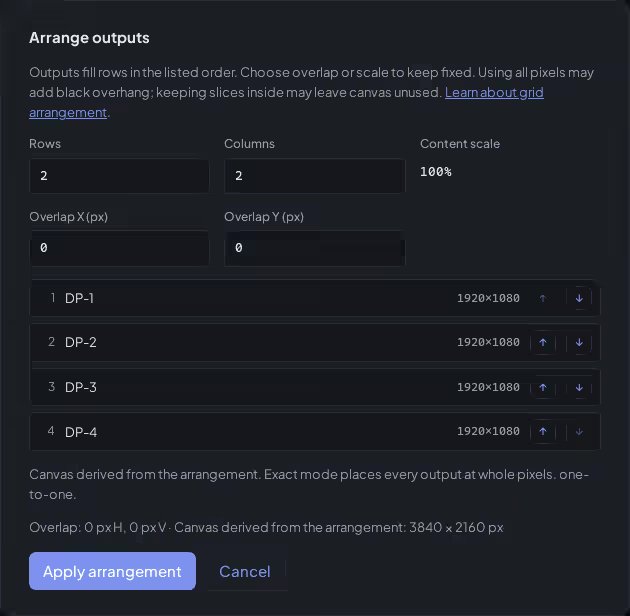
overlapXis a fraction of the seam's raster width (the smaller of the two adjacent outputs'),overlapYof its height. Each is rounded to the nearest whole pixel, never below 0, and the solution reports the rounded fractions asoverlapX/overlapYtogether withoverlapXPxandoverlapYPx. A worked example: a 160 px overlap on a 1920×1080 seam is1/12across (160 / 1920) and4/27down (160 / 1080). Asking for 8.3% on both axes gives 159 px across (0.083 × 1920 = 159.36) and 90 px down (0.083 × 1080 = 89.64). An overlap that rounds to the whole seam is a422:overlapX of 0.99999 rounds to 1920 px, the whole 1920 px seam; overlap cannot reach 100%. - The canvas is derived: it is the whole-pixel bounding box of the arranged
slices (a 2×2 of 1920×1080 outputs at 160 px overlaps is 3680×2000), reported
as
canvasin the dry run and written toprojection.canvasby thePUT. The canvas you had is replaced. allowUnusedCanvashas no meaning (no unused band, no overhang), andlimitsis omitted: overlap limits are not computed in Exact.outputs[].arrangeOffsetis still added after placement; one that leaves a slice off the whole-pixel grid or outside the canvas is refused when the document is validated.
In the reference UI the dialog takes overlaps in px, shows content scale as a fixed 100%, and reads "Canvas derived from the arrangement".
In Simple and Warp: free arrangement
In Simple and Warp the arrangement is free: content scale is adjustable, the canvas is not derived from whole-pixel overlaps, and the daemon never grows an overlap. Grid arrangement is the full reference for the request fields, the solver's rules and the response.
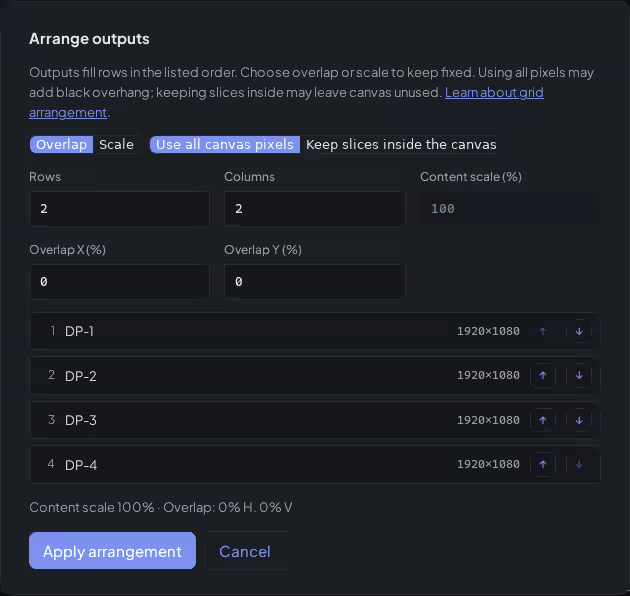
What the reference UI shows in each mode
On the Displays tab the toggle reads Exact | Simple | Warp. Switching to
Exact first asks the daemon what would happen
(above). If the layout would be reset, the page asks to
confirm before changing anything: Switching to Exact resets the layout:
<reasons>. Continue?. If the layout is kept, it switches directly. Leaving
Exact changes only the mode.
While in Exact the UI hides the Warp editor, pins and centers, the
Resampling filter, the canvas presets, rendering scale and recommendation,
and the content scale input. It disables the output scale ("Fixed at 1.0 in
Exact mode"), steps the crop position in whole pixels, shows the crop size as
the raster read-only, and makes the canvas fields read-only beside a Fit
canvas to outputs button, which sets the whole-pixel bounding box of the
outputs (the daemon validates it). The arrangement dialog is described
above. The Exact button is disabled, with exactReason as
its tooltip, where Exact is unavailable (status).
The Displays tab also marks each output whose mapping is verified one-to-one (or a whole-number scale) with a chip; see The whole-number chip. Whether slices are stored and edited in percent or pixels is covered under Slice units; Exact is always pixels.